
WinBerry Casino App
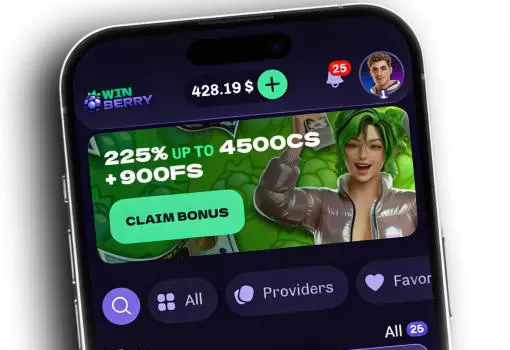

At WinBerry Casino, we know that modern players want to enjoy their favourite titles anywhere, anytime. That's why we've built a mobile platform that lets you carry the entire casino in your pocket. Whether you're waiting for a bus or relaxing at home, Winberry Casino is always within reach through your smartphone or tablet browser.
Here at Winberry, we provide a fully responsive HTML5 experience rather than a traditional downloadable application. This means you won't find a WinBerry Casino app in the Apple App Store or Google Play — instead, our site adapts instantly to any screen size, giving you smooth, lag-free gameplay directly through your mobile browser.
Why Players Choose Our Mobile Platform
Many of our members tell us they prefer our browser-based approach because it saves storage space and updates automatically — no waiting for app updates from a store. Our Winberry platform also loads faster on most networks since there's nothing to download beforehand.
Beyond convenience, our VIP program follows you seamlessly between desktop and mobile. Whether you're climbing from Seed to Winberry status, your XP, cashback percentage, and level-up bonuses sync instantly across devices.
How to Access the Winberry Casino App Experience
Getting started with our mobile platform takes just a few moments. We've optimized every step so you can go from browsing to playing in no time.
For Android Users
- Open your preferred mobile browser (Chrome works great)
- Visit winberry.casino
- Tap the browser menu and select 'Add to Home Screen'
- Confirm the shortcut and find the icon on your home screen
- Launch the app-like shortcut anytime to jump straight into play
For iOS Users
- Open Safari on your iPhone or iPad
- Navigate to the WinBerry Casino website
- Tap the Share icon at the bottom of the screen
- Select 'Add to Home Screen'
- Access your shortcut instantly, just like a native app
Once installed, our WinBerry shortcut behaves almost identically to a downloaded application, loading quickly and keeping you logged in between sessions.
Signing In and Getting Started Quickly
We've simplified the login process so you can get back to the games you love without delay. If you already have an account, simply open your saved shortcut, tap the login button, and enter your credentials. New to Winberry Casino? Creating an account only takes a minute, through our quick WinBerry Casino sign up process:
- Visit our website from your mobile browser
- Tap 'Sign Up' in the top corner
- Enter your email, create a password, and confirm your details
- Verify your account through the confirmation email
- Make your first deposit and claim your welcome bonus
What You Can Play on the Go
We've made sure our entire gaming library of 1,500+ titles works beautifully on mobile. Our WinBerry library includes everything from slots to live dealer tables, so you'll never feel like you're missing the full desktop experience.
- Popular slots like Gates of Olympus, Sweet Bonanza, and Big Bass Floats My Boat
- Live dealer games including Mega Roulette 3000, Turbo Baccarat, and Dragon Tiger
- Crash games and fast-paced game shows such as Mega Wheel and Vegas Ball Bonanza
- Dedicated jackpot titles like Fortune King Jackpot and Rice & Riches
Our Vegas... our Winberry interface automatically adjusts graphics and layout depending on your device, ensuring smooth spins and quick load times even on older phones.
Security and Fair Play on Your Device
We take player protection seriously, and our mobile platform is no exception. WinBerry Casino operates under License No. ALSI-202510054-FI2, issued by the Government of the Autonomous Island of Anjouan. Every transaction and login on your mobile device benefits from the same encryption standards we use across desktop.
We at WinBerry also support secure payment methods directly from your phone, including Interac, VISA, Mastercard, Apple Pay, Google Pay, and several cryptocurrencies such as USDT and ETH. Your deposits and withdrawals stay protected no matter which device you choose.
Claiming Your Welcome Bonus on Mobile
One of the biggest perks of playing through our mobile platform is that you never miss out on promotions. At Vegas... excuse us, at Winberry Casino, we extend our full WinBerry Casino welcome bonus package to mobile players, no exceptions.
| Deposit | Bonus |
|---|---|
| 1st Deposit | 250 FS + 100% match |
| 2nd Deposit | 200 FS + 75% match |
| 3rd Deposit | 225 FS + 50% match |
| Total Package | 300% + 675 FS |
Our Winberry team makes sure these offers activate automatically once you make a qualifying deposit from your phone, so there's no need to switch to desktop.
Staying Connected with Our Support Team
We offer multiple ways to reach us whenever you need help on mobile:
- Live Chat: available 24/7 directly through the mobile site
- Email: [email protected]
- VIP Email: [email protected] for loyalty members
- FAQ Section: accessible from any page on your phone
Our support agents speak both English and French, so you'll always find assistance in your preferred language, whether you're chatting from your couch or on your lunch break.

Final Thoughts
We built our mobile experience with one goal: to give you everything our full casino offers, minus the hassle of downloads and storage limits. Whether you're spinning Gates of Olympus during a commute or chasing live dealer wins before bed, WinBerry Casino keeps pace with your lifestyle. Join us today and discover just how smooth mobile gaming can be.
FAQ
Do you have a downloadable WinBerry app?
We don't offer a native app through app stores. Instead, we provide a fully responsive mobile website that you can add to your home screen for app-like access.
Is playing on mobile different from desktop?
Not at all. We've optimized our entire library, bonuses, and account features to work identically across both desktop and mobile browsers.
Can I claim the welcome bonus from my phone?
Yes, our welcome package of 300% + 675 FS is available regardless of which device you use to make your first three deposits.
What devices are compatible with your platform?
Our site works smoothly on both Android and iOS devices through modern browsers like Chrome and Safari, with no minimum app requirements.
How do I contact support while using the app shortcut?
You can tap the live chat icon directly within your mobile browser session, available to you 24/7 in English and French.
Content updated: October 09, 2026